PfdLabs has always been about giving process engineers and metallurgists the right tools for the job. Today we are adding a new icon library that many of you have been asking for — Simplified Symbols.
These are clean, schematic-style process engineering symbols inspired by the industry standards used in tools like HYSYS, Metsim and Visio Engineering — and aligned with the ISO 10628 guidelines for process flow diagrams.
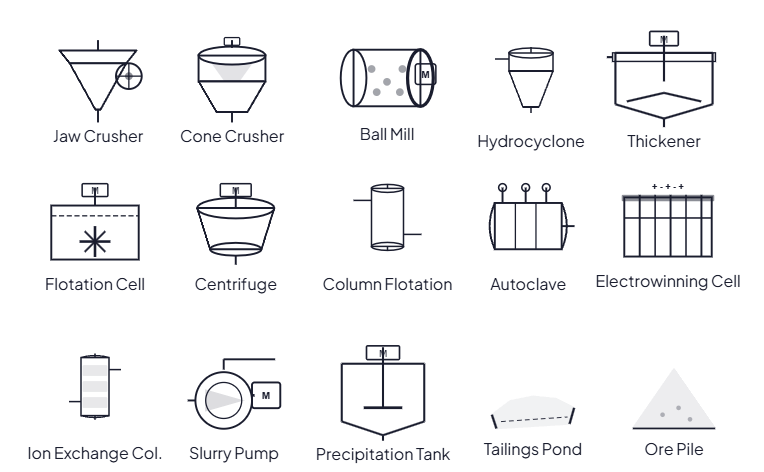
The new Simplified Symbols library — schematic icons for process engineering flowsheets
Three Icon Styles, One Editor
PfdLabs now gives you three distinct icon styles to choose from, all available in the same drag-and-drop editor:
3D Industrial
Photorealistic 3D rendered icons. Ideal for presentations, reports and client-facing documents where visual impact matters.
2D Industrial
Detailed technical illustrations with shading and depth. A classic engineering drawing style that balances clarity with detail.
Simplified
Clean schematic outlines inspired by HYSYS and Metsim. Perfect for quick sketches, training materials and technical documentation.
What is in the Simplified Symbols Library?
The library covers the most common equipment categories in mineral processing and hydrometallurgy:
Comminution
Jaw Crusher, Cone Crusher, Hammer Crusher, SAG Mill, Ball Mill — the core size reduction equipment for any mineral processing flowsheet.
Classification
Hydrocyclone, Vibrating Screen, Spiral Classifier — for separating particles by size after grinding.
Separation
Thickener, Clarifier, Flotation Cell, Column Flotation, Centrifuge, Filter Press, Drum Filter, Disc Filter, Vacuum Filter — the full range of solid-liquid separation equipment.
Hydrometallurgy
Agitated Tank, Leach Reactor, Autoclave, Neutralization Tank, Precipitation Tank, Electrowinning Cell, Mixer-Settler, Extraction Column, Stripping Column, Ion Exchange Column, Storage Tank — covering the complete hydromet circuit from leaching to metal recovery.
Transport
Slurry Pump, Belt Conveyor, Screw Conveyor, Apron Feeder, Pipeline, Valve, Heat Exchanger — everything needed to move material through the plant.
Tailings and Environment
Tailings Pond, Ore Pile — for representing storage and waste management in the flowsheet.
Why Simplified Symbols?
Different situations call for different levels of visual detail. A schematic style has several advantages over photorealistic icons in many engineering contexts:
- Clarity at small sizes — schematic symbols remain readable even when a diagram has dozens of equipment items
- Faster to read — engineers trained on HYSYS or Metsim recognise these symbols instantly
- Professional standard — aligned with the conventions used in industry-standard process simulation software
- Print-friendly — clean black outlines reproduce well in black-and-white documents and engineering reports
How to Use Simplified Symbols
Open the PfdLabs editor and look for the Simplified Symbols panel in the left sidebar — it sits below the 3D and 2D Industrial Symbols panels. Click to expand it, filter by category or search by name, and drag any symbol onto the canvas.
Like all icons in PfdLabs, Simplified Symbols can be:
- Moved freely on the canvas
- Resized by dragging the orange handle in the bottom-right corner
- Labelled with a custom name
- Connected to other nodes with edges — including smooth angle, straight and curved routing
- Exported to PNG, SVG or PDF